Makerspace Under Construction

We are building a makerspace in the East Boston EEC! A makerspace is a space that is created within a library, school, or its own independent space where individuals can come and create a variety of things – 3D printing projects, circuitry, papercrafts, recycled art, wood and laser cutting projects, and projects built with computer code. These makerspaces provide hands-on learning experiences where problem solving skills and creativity are valued. The website for the Keet Gooshi Hen Elementary School’s makerspace says it best:

“A makerspace is a student centered learning environment with limitless possibilities.”

Our makerspace will be located in the school library as a place where student and parent voices will be amplified. This will become a safe space that counters the typical narrative of a library, where there is a culture of silence.  To understand the makerspace movement in schools, check out the following video by Dr. Paulo Blikstein, assistant professor at the Stanford University Graduate School of Education and director of the Transformative Learning Technologies Lab and the global FabLearn Program:

For several months, I have been working with the Tufts Center for Engineering Education and Outreach (CEEO) to understand how to create a makerspace at my school that is conducive to student learning and that embraces the unique interests and needs of our students. What I’ve been learning I will take back to the East Boston EEC to get the project underway.

This past Wednesday, I spent hours sorting books, clearing out the back of the library, collecting boxes, and doing other general cleaning and organizational tasks. The Innovation Team will meet next Wednesday to work on the project after school. Students will be able to conduct research, create projects, and do other fun learning activities once the makerspace is complete. Some of our young girls have already found the makerspace to be a perfect spot for doing the seated meditation and downward dog poses in yoga!

Upcoming STEAM Events For April

Families and Friends,

Spring has finally hit Boston, and along with the warmer weather are a few upcoming events that you can participate in with your young STEAM inventor. I hope that if you do decide to make it out to any of these events to remember the importance of play in the work.

APRIL 14-23 – CAMBRIDGE SCIENCE FESTIVAL

CSF-Logo-PNG.png

The Cambridge Science Festival is celebrating 11 years from Friday, April 14th to Sunday, April 23rd! Some of the FREE, kid-friendly attractions include:

APRIL 16 – MITxMAKE MAKEFEST

https-2f2fcdn-evbuc-com2fimages2f285270632f1561083704562f12foriginal.png

Interested in learning more about makerspaces and the maker community at MIT specifically? Purchase a ticket for MITxMAKE 2017, to be held at the MIT Zesiger Sports and Fitness Center on 120 Vassar Street, Cambridge.

APRIL 22 – MARCH FOR SCIENCE

https-%2F%2Fcdn.evbuc.com%2Fimages%2F29139525%2F55508942567%2F1%2Foriginal.jpg

Science is important. This includes scientific policy, discovery, communication, outreach, and research funding. If you are interested in letting this be known, then you should definitely be aware of the March For Science on April 22nd in Copley Square. There’s even a Kid’s March with activities and speakers from 1:00-4:00 pm.  Check out the March For Science website to find out how to march, how to volunteer, or even to learn more information about this important stand for science.

Young STEAM Inventors At Work/Play

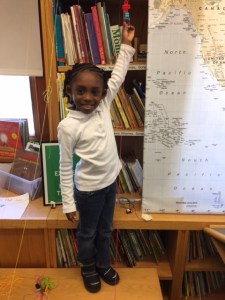
Kindergarten and 1st grade students have been exploring physics concepts such as force and motion. Check out these students in action!

This slideshow requires JavaScript.


Additional Resources To Explore Math and Science Concepts

Screen Shot 2017-03-29 at 5.08.28 PM

Space by THX:  This iPad app allows users to create their own universe using the laws of physics. Just at your child’s or students’ fingertips, they are able to make a world as they would like it, and featuring different stars, planets, and other celestial bodies. They would even be able to test out how force and motion play out in space.


gracie_logo_home@2xGracie & Friends™ Math Apps:  The First Studios team at WGBH has several apps featuring a young Black girl named Gracie and her inquisitive friends. These iPad apps are great tools for preschool mathematics. There is also a Teacher’s Guide with a curriculum that preschool teachers can use in their classes to supplement their students’ learning of important math concepts.

The Gracie & Friends™ apps fall into two categories based on the early math concept they reinforce:

Equipartitioning (the mental math ability to divide things up into equal groups or parts)

Screen Shot 2017-03-29 at 5.12.03 PM  Screen Shot 2017-03-29 at 5.12.11 PM  Screen Shot 2017-03-29 at 5.12.18 PM  Screen Shot 2017-03-29 at 5.12.43 PM

Subitizing (the mental math ability to estimate amounts without counting) 

Screen Shot 2017-03-29 at 5.12.58 PM  Screen Shot 2017-03-29 at 5.13.12 PM  Screen Shot 2017-03-29 at 5.13.22 PM  Screen Shot 2017-03-29 at 5.13.41 PM


Please comment below if you have downloaded any of these apps for your child or classroom.

Training On the Value of Play

A couple of weeks ago (March 9th to be exact), I attended a training on social-emotional learning at the Lego® Education North America office. In case you weren’t aware, Lego®’s education branch recently opened an office in 2016 that is located right here in Boston. They moved from Kansas to Bolyston St. to focus on applying STEM in the classroom.

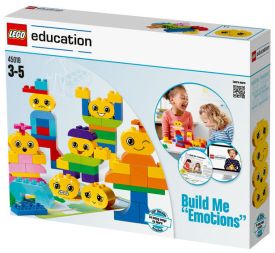
Children learn through play. Those of us who attended the training learned about using a combination of play and a holistic approach that recognizes a child’s physical, emotional, cognitive, creative and social abilities while in the classroom. We also got a chance to interact with a new kit from Lego® for supporting children’s emotional needs in the classroom called the “Build Me Emotions” kit.  You can find out more about it on their website.

IMG_7912

Here I am testing the kit out. Isn’t it cute?

46691e7d-9e46-4652-acc4-a524008e7cff

The kit comes with many different pieces that a child can use to reflect or reconstruct their social-emotional identity.


Of course, there’s always time for play in a company like Lego®. Check out the following clip to see what cool project I discovered while visiting Lego® Education North America’s amazing office space! You should also visit LEGOLAND Discovery Center in Somerville with your child, or with your students.

Do You Want To Build a Treehouse?

TREE HOUSE

A tree house, a free house,
A secret you and me house,
A high up in the leafy branches
Cozy as can be house.
A street house, a neat house,
Be sure to wipe your feet house
Is not my kind of house at all-
Let’s go live in a tree house.”

~ Shel Silverstein, Where the Sidewalk Ends

The unit that I have been doing with the kindergarten and Grade 1 classes is on Paper and Wood. I decided it would be a great opportunity to adapt a previous lesson that I documented at the Shaw School in order to explore this unit. Using the four domains –Reading, Listening, Speaking, Writing – as well as the engineering design process and a project-based approach framed through the Mission Hill Habits of Mind, the students designed and created their treehouses out of different forms of media. Throughout this project, students were reminded about the positive role of feedback in this process.
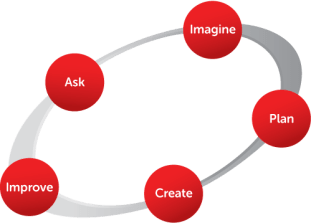
edp_basic

From the Engineering Is Elementary Project at the Museum of Science


ASK: Design your own treehouse.

IMAGINE:  Students came up with ideas of what they wanted their treehouse to look like, as well as how they wanted their treehouse to function.We looked at treehouses around the globe, read stories about treehouses (such as Shel Silverstein’s Where The Sidewalk Ends), and conducted research online. Just like with the Shaw School, a lot of the students at the East Boston EEC became fascinated with ziplines and wanted to incorporate them into their treehouses.

PLAN: Student put their ideas onto grid paper and labeled their concepts. Grade 1 worked on 1st/2nd/3rd drafts of their treehouse design. All students received feedback by presenting their blueprints to their classmates using the “Feedback is kind, specific and helpful” protocol. I took their blueprints to the Tufts Center for Engineering Education and Outreach and had the designs etched onto thin pieces of wood. We are still in the process of laser etching the blueprints for one of the classes.

IMG_7876

“My brain worked really hard to think of my treehouse design. Then I had to draw the idea from my brain. Then I had to write my words so people would know what I drew. Then I had to write words into my sentences and then finally I drew my sketches. I didn’t do all of this in one day because it took weeks to finish it. I’m proud of my work and I was able to change what I wanted because I first used pencil. I used the felt marker to trace over the pencil. Phew!!! The End.”

unnamed (1)

Ms. Alicia using the laser cutter at Tufts Center for Engineering Education and Outreach to etch treehouse blueprints onto wood for the kindergarten students.


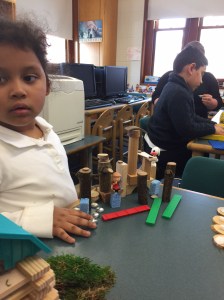
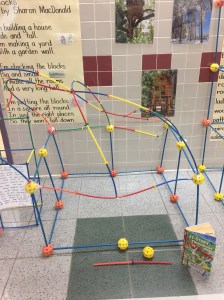
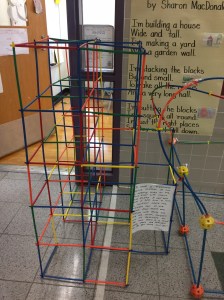
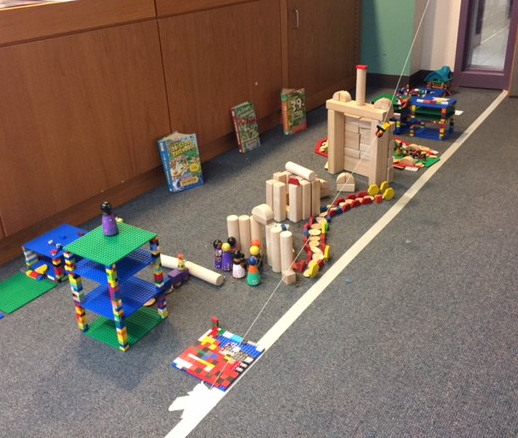
CREATE: Students formed collaborative groups to construct models of their treehouses in the school hallway using huge straws. Afterwards, they recreated treehouses on tabletops and the floor using different types of blocks, such as wooden blocks and Legos. They used labels to explain different parts of their designs on the treehouse models. For students who wanted to add a zipline to their project, they were given the chance to create the passenger out of Lego blocks.

Hover your mouse over the following images to view the comments that students made regarding their projects!

IMG_7857.JPG

Angel from Brazil designed his zipline with a passenger “…who looks like me and my family”.


IMPROVE: Students participated in a Gallery Walk of the structures that their peers created. In the Gallery Walk, students walked around, looked at the structures, and provided feedback. They also provided feedback on their own projects, and gave very interesting insights (you can follow this by hovering your mouse over the images below).

No ‘I’ In “Team”

The students had some key takeaways on the value of cooperation and collaboration (hover over the images below to view them):

IMG_8082

“This is the ‘Research Tree house’, where kids can do their own research. We had out own ideas about what we wanted to design and build. Some of us looked at our blueprints and then built certain parts. Ms. Alicia showed us pictures of treehouses in Africa, Brazil, Italy, China, Japan, USA, and other countries. We got some ideas from those tree houses, too. We built platforms, too, so that our Lego people could land safely. We also looked at pictures that were drawn in the 13-Story Tree House book and the rest of the other books in the series. We learned a lot and had fun. We don’t want to take them down yet.” Julian, Grade 1

“All I can say is, awesome engineers at work.”  Jahsier, kindergarten student.

“This is as fun as the Children’s Museum. I love Engineering and science classes.” Mateo grade 1, student


Building Houses For Tony

unspecified.jpg

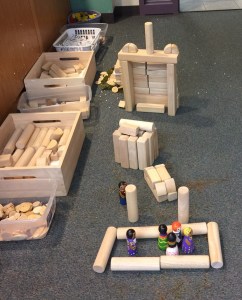
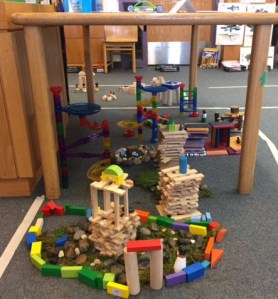
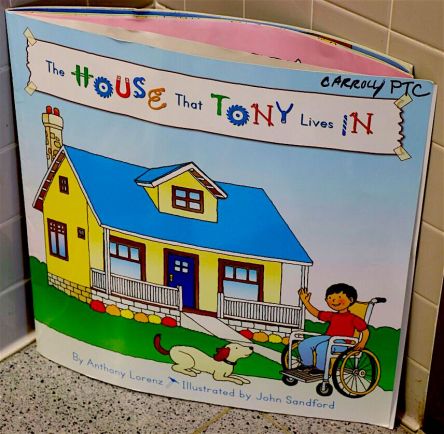
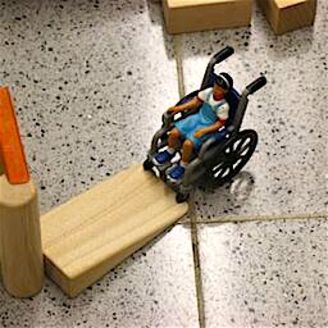
In the winter term, kindergarten and Grade 1 students worked on a unit project based on a big book we read in class called The House That Tony Lives In by Anthony Lorenz. Students learned about the physics of inclined planes through Tony’s wheelchair ramp that he uses to get inside his house. Then, they were given a challenge to create a house fit for Tony to live in using wooden blocks.

116.jpg

The projects that students created were informed by the Engineering Design Process, a step-by-step process that engineers, designers, scientists, and other professionals use in the real world to solve problems and come up with solutions. There are different versions of the Engineering Design Process. The version that I used with students was developed by the Engineering Is Elementary Project at the Museum of Science, Boston. The steps are: Ask, Imagine, Plan, Create, and Improve.

ASK: What is the problem? How have others approached it? What things are limiting your results?

IMAGINE: What are some solutions? Brainstorm ideas. Choose the best one.

PLAN: Draw a diagram or blueprint. Make lists of materials you will need to make your solution.

CREATE: Follow your plan and create something. Test it out!

IMPROVE: What works? What doesn’t? What could work better? Test your design out, then change it if it doesn’t work to make it better.

One key fact about the Engineering Design Process is that it is iterative. This means that it can be repeated over and over again until the problem is solved. The kindergarten and Grade 1 students learned that it is okay to make mistakes and to make many mistakes if with each mistake, a different lesson is learned and improvements are made along the way. For each step in the process, I used visual magnets to illustrate this process with students, and each grade level was assessed differently based on assessment goals posted on the wall.
unspecified-1.jpg

Here are the results! Check out a few of the houses that students built for Tony, as well as what students had to say in their reflections of their projects (the projects and statements are in no particular order):

This slideshow requires JavaScript.